skip to main |
skip to sidebar
I plugged a USB flash drive into my Windows XP PC and it did not appear in My Computer. It used to appear as Drive G: two months ago. When I checked Disk Management the flash drive is there with a drive letter J: and I can open it in the Computer Management window.
It took me a while to figure out the real culprit. I changed the drive letter of the flash drive to Z: in the Computer Management window but it did not solve the problem.
The only hardware I connected to my PC for the last two months was a three-partitioned external hard drive which is currently assigned the drive letters G, H, and I.
Would unplugging the external hard drive enable the USB flash drive to appear in My Computer? No, it did not.
 Suddenly a thought came into my mind: Tweak UI. I have this Powertoy and I remembered checking boxes for drive letters.
So there it was the culprit. All the checked drive letters have been assigned to my internal and external hard drives and DVD drive. No drive letters were assigned for new removable storage.
I opened Tweak UI, checked the drive letter J: in the window and click OK. And that solved the problem—although I have to change the flash drive’s drive letter to J: again since I changed it to Z: earlier.
I was practicing how to write programs one day learning how to create a line in Liberty BASIC when it came to me that I could create a triangle. One thing led to another that I thought I create a Pythagorean Triple Generator and at the same time draw the triangle in scale. The result is a program written in Just BASIC language.
The program is available at this website, CST Geometry. You may download the program free.
One of the activities that I did when I bought my PC was to learn programming. There are many programming languages that can be learned free in the Internet. One is Liberty BASIC which is derived from the traditional BASIC language, and then there is Just BASIC. Although the later is a watered down version of the former, the fun thing about Just BASIC is that you can create a .exe file from that language for free, i.e., a stand-alone program. The two languages above works on Windows XP.
If you are adventurous enough there are free tutorials for Java and Python languages. To be honest I have learned the basics of these two object-oriented programming languages in their websites, Java Tutorials, and Python.org. Java is a complex language but I was surprised with the way Python’s syntax are written—the syntax is much more like BASIC and reads like English. I have learned from Internet forums, Python is a very powerful programming language. You might like to try to download the free pdf Think Python (note this pdf discusses python 2. Latest version is 3).
Going back to Just BASIC, I have written a program called The Pythagorean Triple Generator.
Not crazy as in mentally unsound but insanely entertaining. I found this website where amusing gadgets can be downloaded and added to my blog's sidebar.
The hamster at the right is an example. And don't feed him too much by the way.
The website is aBowman. Check it out.
A year ago I changed my 80GB hard drive with a 500GB. Both were Seagate SATA. I was thinking of utilizing my old hard drive as an external hard drive and use it as a backup.
Today, I just did that. Much to my surprise as soon as I run the external hard drive, my old data were still there except for my own (administrator) My Documents folder which is now empty and cannot be opened. But the other data, they are still there; documents of limited accounts, mp3s, and video files can be opened and played. I thought that unplugging the hard drive from the motherboard will automatically delete the files.
A warning to all with hard drives they want to sell—wipe out your files for good!
I have a website at Google Sites for my geometry class in high school. Last week, I wrote a piece about the difference of the terms congruence and equality. What a nice way I thought to create an animated GIF to support my article. But don’t look now; Google Sites does not support animated GIFs (nor Javascript), well not directly. I was surprised that Google Sites converted automatically my animated GIF files to PNG. With a couple of Google searches later I found out that Google Sites blocks animated images.
However, there is a workaround for this predicament. Every search I made in the Internet suggests uploading the file into Google Docs or creating a gadget. For me, I did what I always do in my blogs; upload the animated GIF files to Photobucket. It works!
Here’s my website with the animated GIFs, Geometry.
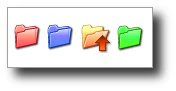 Changing the colors of my folders I thought would look nice in my PC; what I didn’t realize was that it would speed up my work. With customized folder icons, I can quickly pinpoint the specific folder I want to open.
With so many folders colored yellow in my PC, sometimes searching for a particular folder is like searching a needle in a haystack. One way to change the folder icon is to right-click the folder and choose Properties. In the Properties dialog box, click the Customize tab and click the Change Icon button. A Change Icon dialog box opens and select from the list of icons or you can browse to the folder where your icons are saved. Take note that only icons with .ico extensions can be used.
I have these icons with .gif extensions and what I did was to convert them to .ico using GIMP.
Another way of changing the folder icon is to simply change its color. With this method I use a free software called Folder Marker. Folder Marker is a helper which can mark folders by priority (high, normal, low), by degree of work complete (done, half-done, planned) and by the type of information contained in the folder (work files, important files, temp files, private files). When installed, you can customize or colorize—if this is the right term—your folders by right-clicking a folder and choosing Folder Marker among the options.

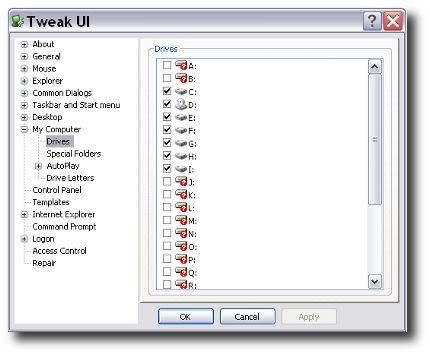 Suddenly a thought came into my mind: Tweak UI. I have this Powertoy and I remembered checking boxes for drive letters.