Showing posts with label Gadgets. Show all posts
Showing posts with label Gadgets. Show all posts
September 4, 2010
External Hard Drive — Can't Access
As I turned on my external hard drive, the LED light came on. I clicked My Computer in Windows XP and to my horror, the USB hard drive is not there. I checked Device Manager, it’s there but it just shows that it’s a USB storage device and no details. Is this the moment I dreaded that an external hard drive is not reliable and I should have listened to a friend to attached it as an internal hard drive instead?
I checked Administrative Tools, nothing—it’s blank. No sign that XP has recognized it as a device. I restarted my PC, still nothing. Why! when in fact the LED light in the hard drive is turned on. I plugged the USB into a different port—still no success. This is beginning to be a puzzle. I started googling, nada, nothing that would solve my predicament.
But why is the LED light on? Were my files deleted by a hard knock on the hard drive, or did it just vaporize?
I put my hands over the drive’s enclosure. Hmmm . . . no vibrations, I couldn’t feel even a slight hum. Is it the power supply? And why is the LED light turned on?
So I tried to wiggle the female end of the power cord in the hard drive, I felt a whirring sound. Oh, the female end of the power cord is not properly seated. I adjusted it and how wonderfully it worked again! What a fool—all along it was the power cord not seated properly.
September 24, 2009
USB Flash Drive Not Appearing In My Computer
I plugged a USB flash drive into my Windows XP PC and it did not appear in My Computer. It used to appear as Drive G: two months ago. When I checked Disk Management the flash drive is there with a drive letter J: and I can open it in the Computer Management window.
It took me a while to figure out the real culprit. I changed the drive letter of the flash drive to Z: in the Computer Management window but it did not solve the problem.
The only hardware I connected to my PC for the last two months was a three-partitioned external hard drive which is currently assigned the drive letters G, H, and I.
Would unplugging the external hard drive enable the USB flash drive to appear in My Computer? No, it did not.
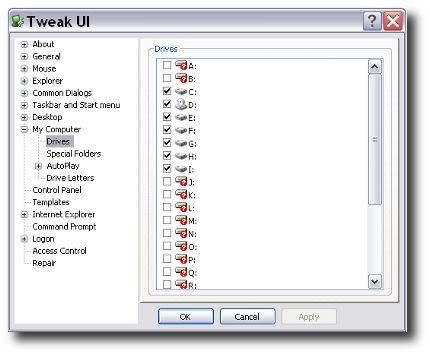 Suddenly a thought came into my mind: Tweak UI. I have this Powertoy and I remembered checking boxes for drive letters.
So there it was the culprit. All the checked drive letters have been assigned to my internal and external hard drives and DVD drive. No drive letters were assigned for new removable storage.
I opened Tweak UI, checked the drive letter J: in the window and click OK. And that solved the problem—although I have to change the flash drive’s drive letter to J: again since I changed it to Z: earlier.
August 27, 2009
Crazy Gadgets
Not crazy as in mentally unsound but insanely entertaining. I found this website where amusing gadgets can be downloaded and added to my blog's sidebar.
The hamster at the right is an example. And don't feed him too much by the way.
The website is aBowman. Check it out.
Subscribe to:
Posts (Atom)