Three weeks ago my computer crashed. This problem was similar to what happened to my PC six months ago. Back then I was able to fix it by wiggling the hard drive socket—but doing the same fix this time didn’t work out. In fact when I turned on the PC, it booted, showed the logon screen, and when I clicked a program it crashed and rebooted. And this process just repeated over and over—sometimes the logon screen would appear momentarily and the PC would reboot itself.
I can’t pin down the usual suspects—malwares, spywares, and viruses—since I can’t open any program let alone my anti-virus program avast! I tried to repair Windows XP which went on successfully and I was able to open my browser but not for long; the symptoms came back even when running XP in Safe Mode.
Desperate for a solution, I searched in the Internet (from a different PC of course) and found the pages from Microsoft and Ask Leo! very helpful.
I reseated the memory modules and other wire connectors inside the computer case to make sure a loose connection is not causing the problem. Indeed it is not—when I turned on the computer, it refused to start and keeps on rebooting.
With a suggestion from a technician, I installed a video card (my PC uses the built-in video adapter in the motherboard). With a new video card, my PC is now working fine.
Showing posts with label Hard Drives. Show all posts
Showing posts with label Hard Drives. Show all posts
January 25, 2011
October 18, 2010
Access Ubuntu Files From Within Windows XP
 If I can access Windows XP files from within Ubuntu Lucid Lynx, can I access Ubuntu files from within Windows XP?
My PC runs on a dual boot system with Ubuntu installed inside Windows XP—the former installed in an external USB hard drive with NFTS partitions, and the latter in the internal hard drive. With Ubuntu not booting all my files are gone. Fortunately, there are tools that can access Linux file systems from within Windows XP and with these tools a user can scavenge the files and salvage the usable materials.
Linux uses a different file system; it's called the extended file system. Extended file system is to Linux as NFTS (or FAT) is to Windows. The default file system of Lucid Lynx is ext4; ext, ext2, and ext3 are the other members of this system. One program that can read ext4 is ext2read. This is the software I used to recover Ubuntu files from within Windows.
Ext2read is an executable that runs on Windows and can read and view files inside an ext2, ext3, or ext4 file system, and save them inside Windows. A screenshot of the program is shown below.
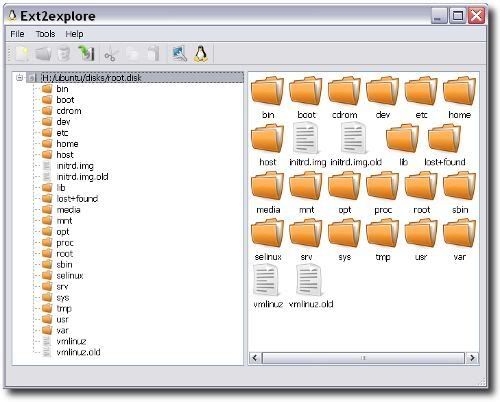
You can get ext2read at the following:
http://ext2read.blogspot.com/
http://sourceforge.net/projects/ext2read/
September 4, 2010
External Hard Drive — Can't Access
As I turned on my external hard drive, the LED light came on. I clicked My Computer in Windows XP and to my horror, the USB hard drive is not there. I checked Device Manager, it’s there but it just shows that it’s a USB storage device and no details. Is this the moment I dreaded that an external hard drive is not reliable and I should have listened to a friend to attached it as an internal hard drive instead?
I checked Administrative Tools, nothing—it’s blank. No sign that XP has recognized it as a device. I restarted my PC, still nothing. Why! when in fact the LED light in the hard drive is turned on. I plugged the USB into a different port—still no success. This is beginning to be a puzzle. I started googling, nada, nothing that would solve my predicament.
But why is the LED light on? Were my files deleted by a hard knock on the hard drive, or did it just vaporize?
I put my hands over the drive’s enclosure. Hmmm . . . no vibrations, I couldn’t feel even a slight hum. Is it the power supply? And why is the LED light turned on?
So I tried to wiggle the female end of the power cord in the hard drive, I felt a whirring sound. Oh, the female end of the power cord is not properly seated. I adjusted it and how wonderfully it worked again! What a fool—all along it was the power cord not seated properly.
Subscribe to:
Posts (Atom)